Available now on visionOS, and rolling out slowly for iOS/iPadOS, is Callsheet version 2026.4. The changelist is not long, but it is mighty:
New Features
- All-new iPad landscape layout that makes far more efficient use of the space. This also applies to macOS and visionOS.
- Support for Jellyfin in the Now Playing view. Note that this does require authenticating with your Jellyfin server; see the Callsheet website for details.
- Added ability to copy a person’s name or their role/job via context menu
- Localized the “Johnny Appleseed” and “Botanist” example name/job shown in Spoiler Settings. I tried to make these fun but if I missed the mark, let me know!
Fixes
- “Hide Spoilers…” button allows tapping in the whole button, rather than just where the text is
- No longer truncate titles/names in the Discover screen whenever possible
- In rare cases, using the chevron to page between movies in a collection could fail
I wanted to discuss two of these new features.
iPad Landsape Layout
For better — but perhaps mostly for worse — I think of Callsheet as
an iOS app. I develop for the iPhone, with all other platforms getting varying
[small] amounts of my attention. I don’t say this with pride, but rather to
excuse explain why it is the iPad layout was so janky for so long. I just
kept having other, bigger, fish to fry.
In addition to prioritizing other things above redesigning the iPad layout, I also… wasn’t sure what to do. I went through a few ideas, but they all died on the vine. Some were too difficult to implement because they broke assumptions that SwiftUI makes about the way you use SwiftUI controls. Some were reasonably easy to implement, but I found they didn’t really improve the way the app felt.
Where I eventually landed was to switch the landscape layout to a sorta-kinda two pane layout. The left side has what I had previously considered the “above the fold” content; the right side has the cast/crew lists.
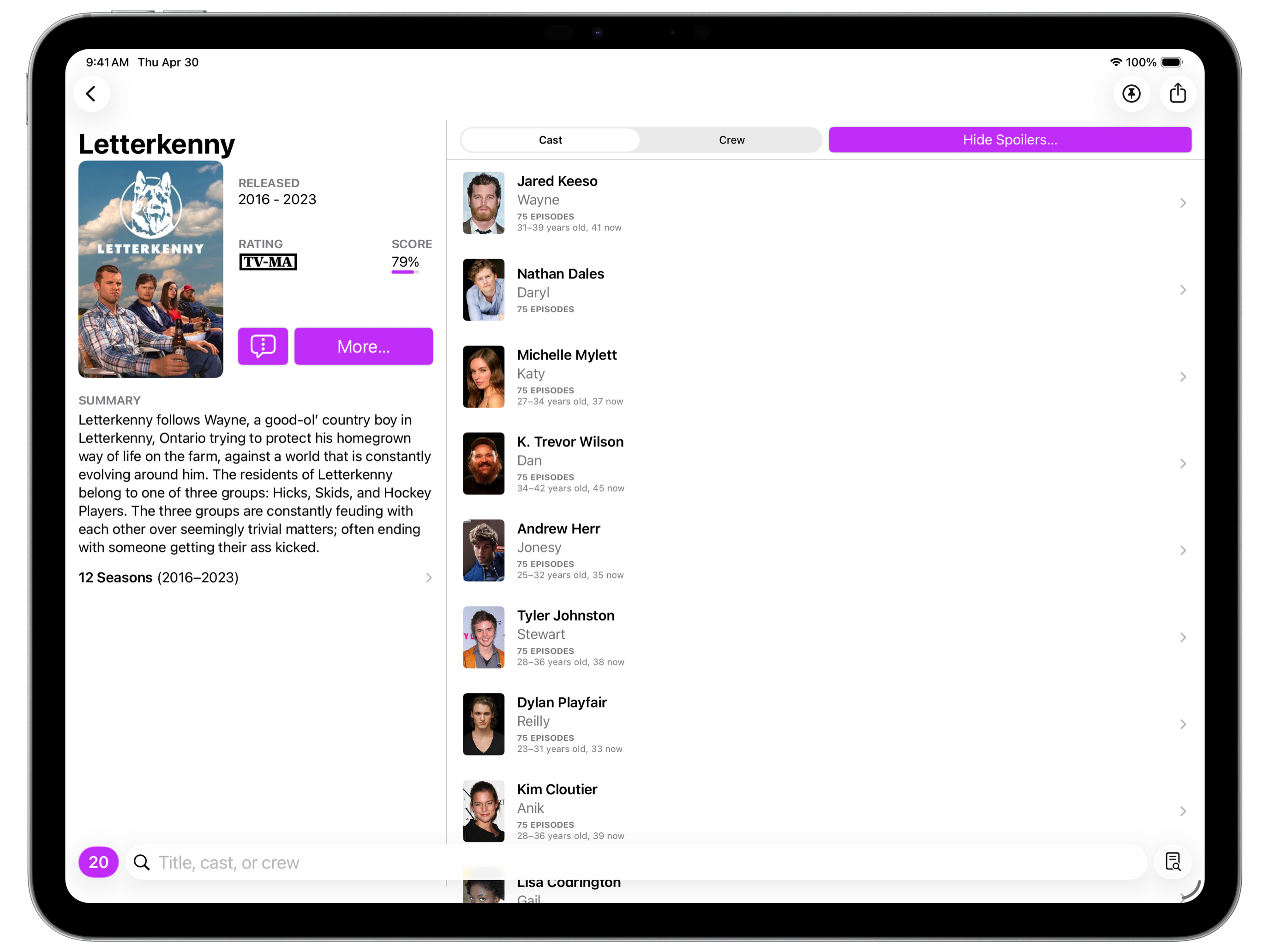
I feel like this works pretty well, and still feels like Callsheet. I may refine it more in the future, but I’m way way happier with how this feels and works than I was with the embarrassment that preceded it.
Jellyfin Support in Now Playing
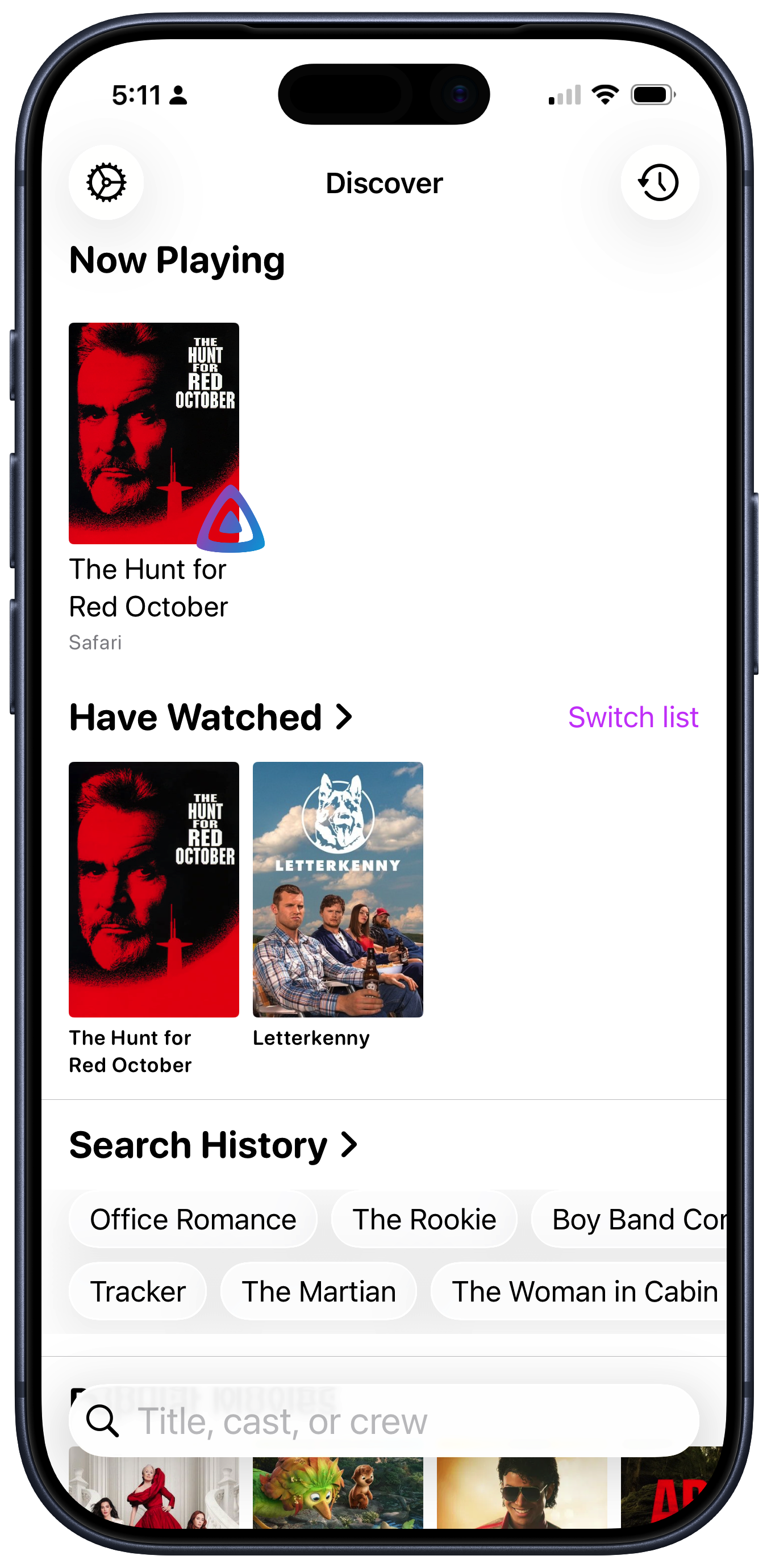
When I first started integrating Plex into Callsheet — Callsheet can show what was currently playing on a local Plex client — I was convinced that doing any sort of authentication/login/authorization/whatever flow was too onerous for a user. I wanted to limit myself only to what could be discovered without any sort of logging in to anything.
I continued this self-imposed rule when integrating with Channels.
Over the last year or so, I’ve become ever-less-enthusiastic about Plex. While my needs from Plex have not changed at all, their interest in serving those needs has diminished dramatically. As such, I’ve long considered if I should find an alternative.
This is also exacerbated by Plex using an absolutely bananas and deeply unreliable mechanism for sharing playback information. It almost never works, and I sorta regret even including it in Callsheet.
A couple months back, I finally gave in, and installed Jellyfin, which is running as a peer of Plex on the same Mac mini.
I’m not here to review Jellyfin in this post, but the ultra-short version is, it’s pretty great, as long as you don’t need to share your content with anyone, and as long as you find a third-party player you like. (For me, I really like SenPlayer.)
Now that I’m using Jellyfin for the consumption of non-ephemeral media, I wanted to see that information in Callsheet. So, I started down the path of seeing what I could glean from my Jellyfin server without having any sort of login dance.
That expedition ended quickly. In failure. Jellyfin doesn’t offer any sort of now playing information if you don’t have some sort of authentication with the server.
However, I was able to discover a pretty reasonable alternative.
Jellyfin has the concept of Quick Connect, in which the user flow is:
- The user specifies the server URL
- The client app gives the user a six-digit Quick Connect code
- The user enters that code on the Jellyfin management website
(I should note the client app flow is a fair bit more complicated, but well within reason.)
While far from auto-discovery, this is far from onerous.
So, that’s what I’ve done.
In Callsheet, if you go to Settings → Persnickety Preferences →
Integrations, there’s a section for Jellyfin. You can enter your
server URL, get a Quick Connect code, and then open a web browser
right there to enter that code in your server’s administration panel.
In principle, this dance should only need to happen once; Callsheet will retain the connection to Jellyfin for as long as your server allows.
Interestingly, if you’re a Tailscale person, and you enter
your 100.x.y.z or x.ts.net address as your server, the Jellyfin
integration is actually the only one of the three that works remotely.
Plex and Channels only work if Callsheet is on the same network as the
playback client.
I’m pretty proud of both of these features, but if you have issues with
either, please feel free to use the in-app feedback feature in Settings
to send me thoughts/questions/complaints/etc. Using the in-app feature
will automatically include a log file that is often helpful in diagnosing
issues.