Since becoming afflicted — becoming a Home Assistant user — I’ve shown the same symptoms as this illness always does: I want to automate everything.
My home automation journey started during the pandemic, with me wanting to have a LED light that illuminated in our bedroom when the garage door was open. This involved a Rube Goldberg contraption involving two Raspberry Pis, a contact sensor, and some custom Python. After the project was over, I had a LED light attached to our headboard that would only illuminate when the garage door was open. It’s saved us from leaving the door open overnight a handful of times.[1]
In the ensuing years, I have wanted to find a similar, but slightly more general-purpose solution. There are some other state-of-the-house things I’d like to monitor, and I’d like to do so in a more central place in the house. Given our house was built in the late 90s, we have RJ11 coming out of one of the walls in the kitchen at nearly eye level. I had tried to convince Erin to let me repurpose that — my vision was to drill a trio of LEDs into a blank faceplate, stick something behind it, and call it a day.
Unfortunately, Erin has taste, and gently led me to the conclusion this would be… a bit of an eyesore. So I had to re-evaluate.
Around this time, I was lamenting this problem on ATP, and a listener pointed me to these now-discontinued HomeSeer switches. At a glance, this is a standard Decora-style dimmer that can be controlled via ZWave. However, upon closer inspection, there are seven LEDs on the left-hand side. Even more interestingly, you can put the switch in “status mode”, which means each of the LEDs can be individually controlled.
And just to put icing on the cake, the listener had an extra that they were willing to send me. Thank you, again, Chris R. 🥰
Once it arrived, I had to teach myself ZWave, and figure out how to get the Homeseer into “status mode”. However, once I did, it was pretty quick and astonishingly easy to get Home Assistant talking to not only the dimmer, but the LEDs as well.
So, here’s where I ended up:
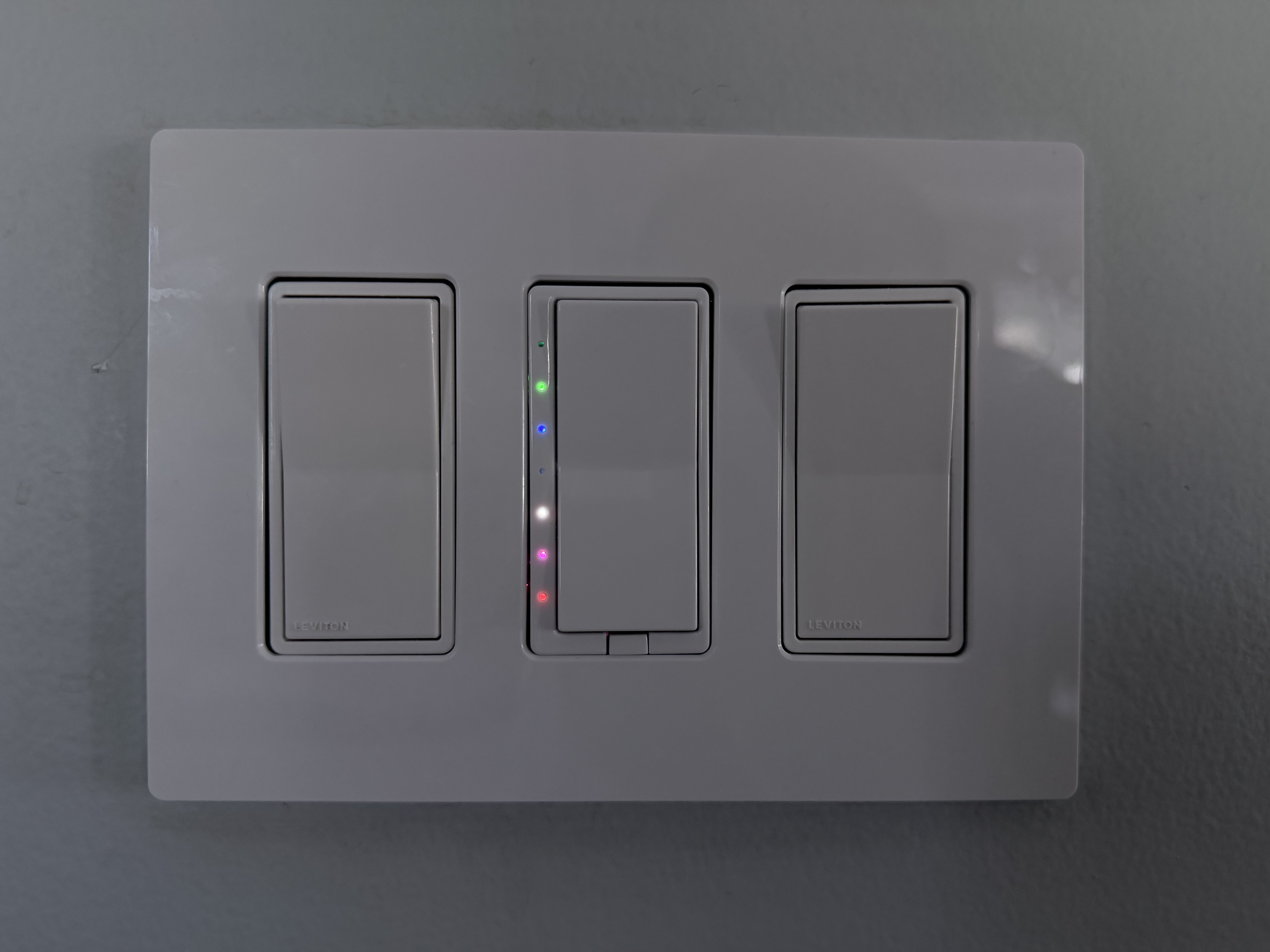
The image is under-exposed on purpose, and the colors are a touch off in this photo, but I assure you they’re vivid but not attention-grabbing when seen in person.
The center switch actually controls the lights above our kitchen table. But for me, it’s the home status board. Here’s what each of the lights indicates, from top to bottom:
| LED Color | Purpose |
|---|---|
| None | Not currently used |
| Green | The laundry needs attention |
| Blue | The mail is waiting |
| None | Not currently used |
| White | The Volvo is charging |
| Magenta | The shed door is open |
| Red | The garage door is open |
The steady/all-good state of the status board is for all of the LEDs to be extinguished. If any of them is on, it doesn’t necessarily mean that something needs attention, but it may.
The green LED will flash while the washer or dryer are running, and remain lit when clothes need to be moved.[2]
The blue LED will illuminate if the mailbox has been opened for the first time in the day, and if that opening happened after 10 AM. We almost always place outgoing mail in the mailbox first-thing in the morning, and the mail almost never comes before dinnertime. A LoRa contact sensor is what’s feeding this.
The white LED will illuminate as long as Erin’s plug-in hybrid is actively charging. Home Assistant has an integration for Volvo.
The magenta LED will illuminate if the shed door is open. Here again, another LoRa contact sensor.
The red LED will illuminate when the garage door is open, and it will flash while it is raising or lowering. Home Assistant has an integration for our weird garage door opener.
This status board is, for any reasonable human, lunacy. None of this is particularly necessary, and I could make a strong argument that most of it isn’t particularly helpful. For example, the distance between the red “the garage is open” LED and the doorway to the garage is approximately three paces.
That said, I have come to quite like having it in the kitchen, where I naturally pass by it many times daily, to be able to see the state of some critical systems in the house. The kids have, slowly, started to learn what LED means what.
Erin could not possibly care less. She’s just happy not to have the eyesore I originally proposed.
Over the years, the way the LED works has changed. It’s still powered by a Raspberry Pi, but instead of some bespoke communication over UDP, it listens for a topic on my local MQTT server, and will illuminate based on that. Currently, Home Assistant will tell it to illuminate if the shed or the garage are open. ↩
We have a natural gas dryer, and thus it uses a standard 110V plug. I put the washer and dryer on their own Shelly plugs, and Home Assistant monitors their power usage. When the washer’s power draw falls below a few hundred watts for a full minute, it is assumed the clothes are waiting to be moved to the dryer.
When the dryer starts drawing a few hundred watts, it is assumed the clothes are drying.
When the dryer is drawing a low wattage, it’s assumed the clothes have been removed. The low wattage is because it’s powering its internal light.
This system isn’t 100% perfect, but it’s been surprisingly accurate. ↩